Quick start
This page builds a small window with a script and a stylesheet. Install ztk first, or paste the script into the playground.
The script
Save this file as counter.tcl:
ztk::style load counter.css
wm title . "Counter"
set count 0
set fast 0
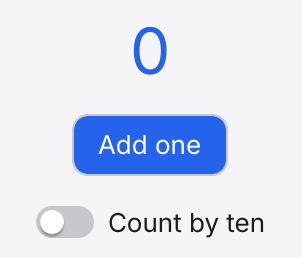
ttk::label .value -textvariable count
ttk::button .add -text "Add one" -style Accent.TButton -command {incr count [expr {$fast ? 10 : 1}]}
ttk::checkbutton .fast -text "Count by ten" -style Switch.TCheckbutton -variable fast
pack .value .add .fast -padx 16 -pady 6
bind . <Key-space> {.add invoke}
The commands are the commands of Tk. ttk::button, pack, -textvariable, and bind work as in wish.
The stylesheet
Save this file as counter.css in the same folder:
#value { font-size: 32px; color: var(--accent); }
TButton.Accent { background: var(--accent); color: var(--accent-fg); border-radius: 8px; }
TButton.Accent:hover { background: var(--accent-hover); }
A type selector is the class of a widget (TButton), #value is the last part of the path .value, and .Accent is the style Accent.TButton. The variables come from the modern theme, so the colors follow the light and the dark scheme.
Run it
ztk counter.tcl                       # a window, in a Wayland session
ztk --headless --scale 2 --exit-after-frames 1 --screenshot counter.png counter.tcl
Next steps
- All widgets, each with a live example.
- Styling and themes: CSS, the classic theme, and
ttk::style. - Animation: transitions and
ztk::animate. - On the web: run the same script in a page.