AI and numeric work
Train a small neural network or run a small language model in Tcl, inside the sandbox. A tensor is a value of the interpreter, so the compute limit and the memory limit also apply to the math.
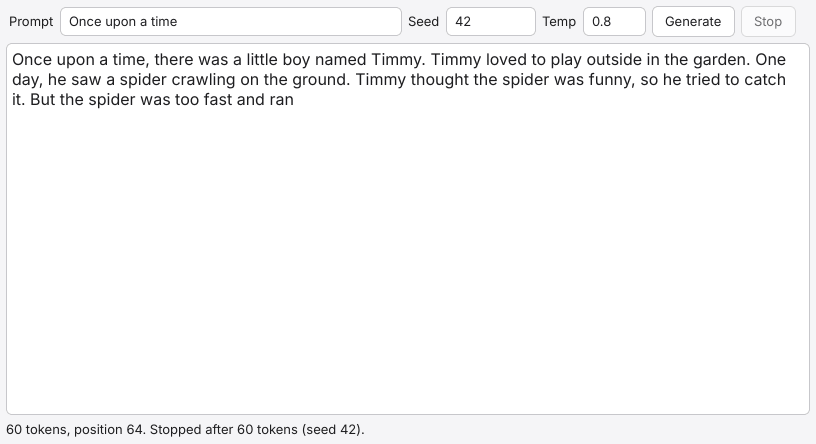
The picture shows a story from a language model in a ztk window. The model and its tokenizer are about 600 lines of Tcl on ztcl::tensor.
Tensors
ztcl::tensor has a typed buffer of numbers with a shape, and the commands on it: arithmetic with broadcasting, matmul, reductions, softmax, and more. A tensor is a value, as a list is:
package require ztcl::tensor
set a [ztcl::tensor of {{1 2 3} {4 5 6}}]
puts [ztcl::tensor matmul $a [ztcl::tensor transpose $a]]
                                         ;# tensor f32 {2 2} {14.0 32.0 32.0 77.0}
Each command charges compute units by the count of elements before its kernel runs. The count depends only on the shapes, so it is the same with and without the JIT. The string form of a tensor reads back to the same bits.
A training DSL
The example train is a prototype of a DSL for small networks. A model is a dict, grad makes the gradient graph of a model, and train is a command with a block. This script trains a network on two spirals with no capability at all:
set net [net spiral -seed 7 { input 2; linear 32; tanh; linear 32; tanh; linear 2; softmax }]
set net [train $net -data [spirals 512 1] -epochs 150 -batch 64 -optimizer {adam -lr 0.02} -seed 3 {
    on epoch { if {$epoch % 30 == 0} { puts [format "epoch %3d  loss %.17g" $epoch $loss] } }
}]
puts [format "accuracy on new points: %.4f" [accuracy $net [spirals 1000 100]]]
puts "open a file: [catch {open /etc/hostname} msg] ($msg)"
epoch 150  loss 0.0029584315961983521
accuracy on new points: 0.9980
open a file: 1 (invalid command name "open")
--compute N and --mem BYTES stop the run with an error. The same script gives the same loss in each run.
On MNIST, a network with 256 hidden units reached a test accuracy of 0.9731 after 3 epochs. The training took 8.0 s on an Intel Core i7-6700K with Linux 7.3.6 and a ReleaseFast build.
A small language model
The example llm runs the 15M model of llama2.c, trained on TinyStories. It reads the checkpoint and the tokenizer files, runs the transformer with a key-value cache, and samples as run.c of llama2.c does. For the same seed, the text is the same as the text of run.c, byte for byte.
lassign [llm open [dict get $o -model] [dict get $o -tokenizer]] m tok
set g [llm start $m $tok [dict get $o -prompt] -seed [dict get $o -seed] \
    -temp [dict get $o -temp] -topp [dict get $o -topp] -steps [dict get $o -steps]]
while {![dict get $g done]} {
    set b [llm step g]
    if {$b ne ""} {
        puts -nonewline [encoding convertfrom utf-8 $b]
    }
}
llm step runs one forward pass. So the window of the picture runs one step for each event, and stays live while the model writes.
On an Intel Core i7-6700K, the example on main gives these tokens per second, best of 3 runs. The text of each row is the same as the text of run.c. Performance has the method and the numbers of v1.0.0-beta.4.
| Runner | Greedy | Sampled |
|---|---|---|
| ztcl, 1 thread | 290 | 273 |
ztcl --tensor-threads 2 |
344 | 318 |
run.c, -O3 |
73 | 71 |
run.c, -Ofast -march=native |
247 | 250 |
Run it
cd examples/usecases/train
ztcl --allow file,channels xor.tcl
ztcl --compute 200000000 --mem 268435456 lib/tensor.tcl lib/graph.tcl lib/train.tcl spirals.tcl
./get-mnist.sh && ztcl --allow file,channels,clock --tclsh mnist.tcl 256 3

cd ../llm
mkdir -p data
curl -sSL -o data/stories15M.bin https://huggingface.co/karpathy/tinyllamas/resolve/main/stories15M.bin
curl -sSL -o data/tokenizer.bin https://raw.githubusercontent.com/karpathy/llama2.c/master/tokenizer.bin
ztcl --allow file,channels --tclsh generate.tcl -prompt "Once upon a time" -seed 42
ztk demo.tcl
The model files have the MIT license of llama2.c and of the model card of karpathy/tinyllamas.
What is in ztcl
ztcl::tensor is part of ztcl. The training DSL and the language model are prototypes: they run on the CPU only, and the DSL has a small set of layers and the optimizers sgd and adam.
More
- ztcl::tensor: the value, the commands, and the compute cost.
- Limits and capabilities: the compute limit and the memory limit.
- The JIT.
- The source:
examples/usecases/trainandexamples/usecases/llm.