
Get started
Open a graph
A graph is a folder. Outliner reads the Markdown (.md) and Org (.org) files in it.
outliner ~/Documents/my-graphWith no folder, Outliner opens the graph of the last run, or asks for a folder. An empty folder is a new graph: Outliner makes journals/ and pages/ when you write the first block.
| Folder | What it has |
|---|---|
journals/ | One file for each day, such as 2026_11_27.md |
pages/ | One file for each page. Projects___Outliner.md is the page Projects/Outliner |
logseq/config.edn | The settings of the graph |
assets/ | Images and other files. Outliner does not read them as pages |
The window
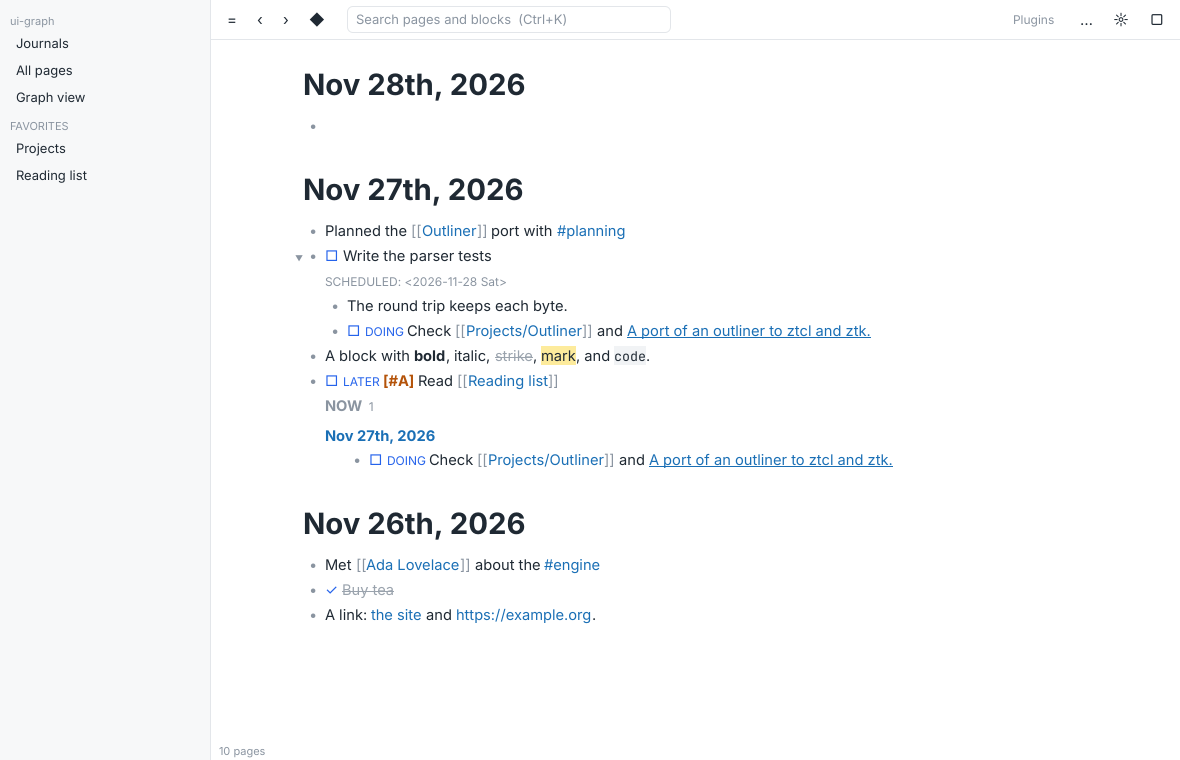
- The left sidebar has the journals, the list of all pages, the graph view, your favorites, and the recent pages.
- The toolbar has back and forward, the search, the plugin button, the command list, the theme switch, and the switch of the right sidebar.
- The main area shows the journals or one page.
- The right sidebar shows more pages next to the main area. Hold Shift and click a link to open it there.
Write
- Click a block, or click the empty block of today.
- Type. Press Enter for a new block.
- Press Tab to make the block a child of the block above. Press Shift+Tab to move it back.
- Type
[[for a link to a page. Type/for the commands.
Outliner saves each change to the file a moment after you stop typing.
Options of the program
| Option | Effect |
|---|---|
--theme light or --theme dark | The theme at the start |
--page NAME | The page at the start |
The settings and the index cache are in ~/.config/outliner (Linux and macOS) or %APPDATA%\Outliner (Windows). The variable OUTLINER_HOME sets another folder.