
Agent tasks
An agent task is work for a language model on a part of your notes, such as "summarize the pages with the tag project-x and give me a PDF".
This version has the scope and its preview. It does not run a task: the run needs an isolated virtual machine and a model, and the ztk program does not give them to an app yet. Run the task writes a blocked entry to the activity report, and no data leaves the app.
The scope and the preview
- Open the command list (Ctrl+Shift+P) and choose Agent tasks.
- Write the task.
- Choose a scope: a tag or a page link, a simple query, or a list of pages.
- Read What the task gets: each page with its count of blocks, and the exact text.
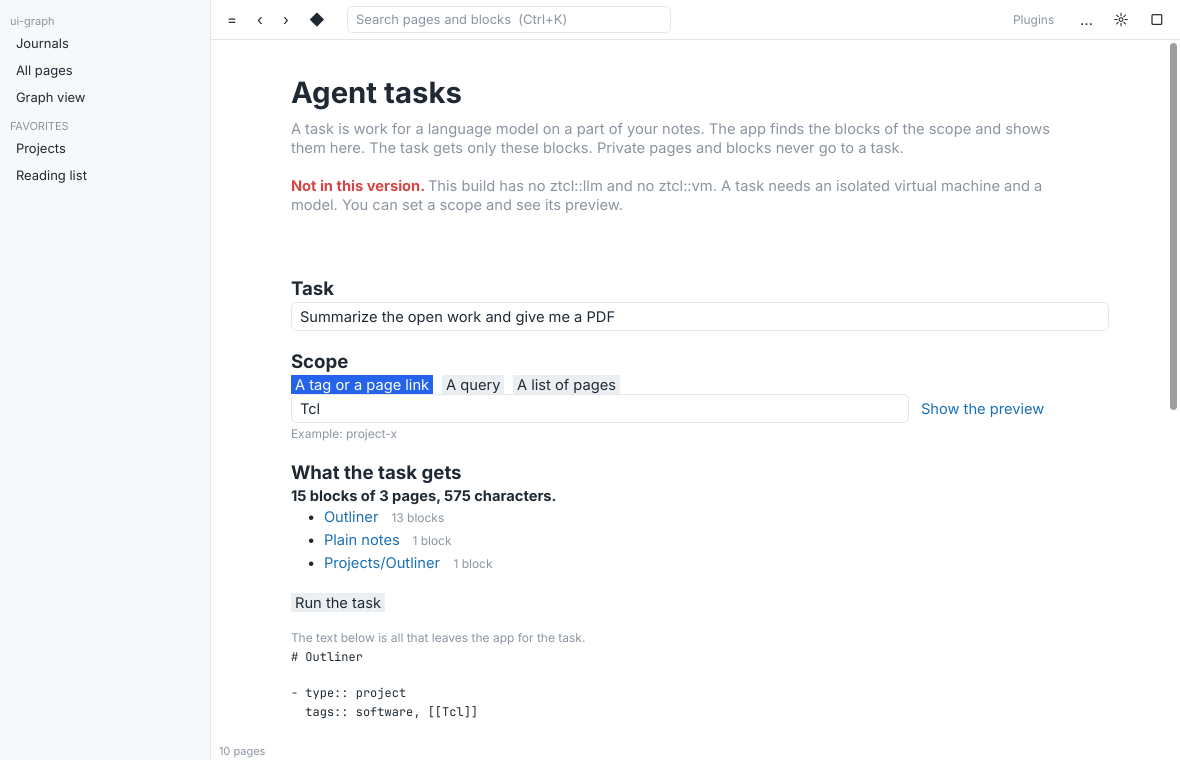
The app finds the blocks of the scope itself. A task cannot ask for more. A private page, a private block, and a private property stay out of each scope, and the preview shows the count.
The plan of the run
- A new virtual machine for each task, with only the text of the preview.
- The network of the machine reaches only the model that you chose: a local model, a service with your key, or a command line tool.
- The tools are the tools of the task: summarize, extract, rewrite, and a PDF writer.
- The result (a PDF, a new page, or blocks) comes back for you to accept. The machine is deleted.
- The activity report has the scope, each call of the model with its size, each tool step, and the result.