Menus on iOS
A phone has no menu bar and no right button. This page shows the menus that work by touch on iOS, and the long press that opens a context menu.
Menus by touch
A tap on a menubutton, a ttk::menubutton, or a ttk::combobox opens its menu or its list. A tap on an entry of the menu chooses it. ztk draws the menu in the window, with the look of the theme.
ttk::menubutton .fruit -text "Fruit: Plums" -menu .fruit.m
menu .fruit.m -tearoff 0
foreach f {Apples Pears Plums Cherries} {
    .fruit.m add command -label $f -command [list .fruit configure -text "Fruit: $f"]
}
pack .fruit -padx 20 -pady 20
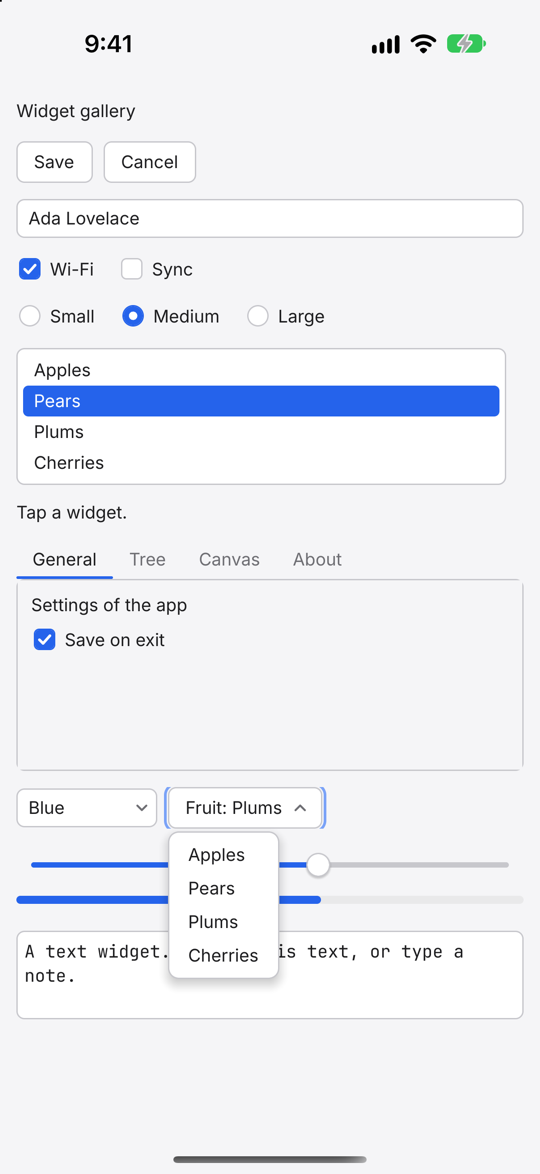
An option menu of tk_optionMenu opens over its button, with the current value under the finger. Slide the finger to an entry and lift it.
In place of a menu bar
-menu gives a toplevel a menu bar as a row at the top of the window, as on Linux. A phone has little room, so put the commands of an app in a ttk::menubutton or in buttons. One script can do both:
if {[tk touchscreen]} {
    ttk::menubutton .more -text "More" -menu .m
    pack .more -anchor e -padx 8 -pady 8
} else {
    . configure -menu .bar
}
.m and .bar are menus of the script.
Context menus
A long press is button 3 on a widget with a binding of button 3. So the context menu of a desktop app opens on a phone with no change:
menu .ctx -tearoff 0
.ctx add command -label Copy -command {puts copy}
.ctx add command -label Delete -command {puts delete}
listbox .l
pack .l -fill both -expand 1
.l insert end Apples Pears Plums
bind .l <Button-3> {tk_popup .ctx %X %Y}
The menu opens under the finger. A tap on an entry picks it, and a tap out of the menu closes it. A long press has the details.
The next page, iOS features, shows the renderer, the files, and the life of an app.