Widgets on Windows
The widgets of Tk and ttk work on Windows with no change to a script. This page shows how they look, how the window scales, and the keys and the text on Windows.
The Fluent look
On Windows the default theme has the Fluent look of Windows 11 apps. Its shapes, strokes, fills, and sizes come from the theme resources of WinUI 3, in light and dark.

ztk examples/platform-gallery.tcl tab=tree.The window follows two settings of Windows, also while the app runs:
| Setting | What follows it |
|---|---|
| The dark mode of apps | The colors of each widget, the title bar, the frame of the window, and the menus. |
| The accent color | The buttons of the style class primary, the line under an entry with the focus, the check and radio buttons, the switches, and the scales. |
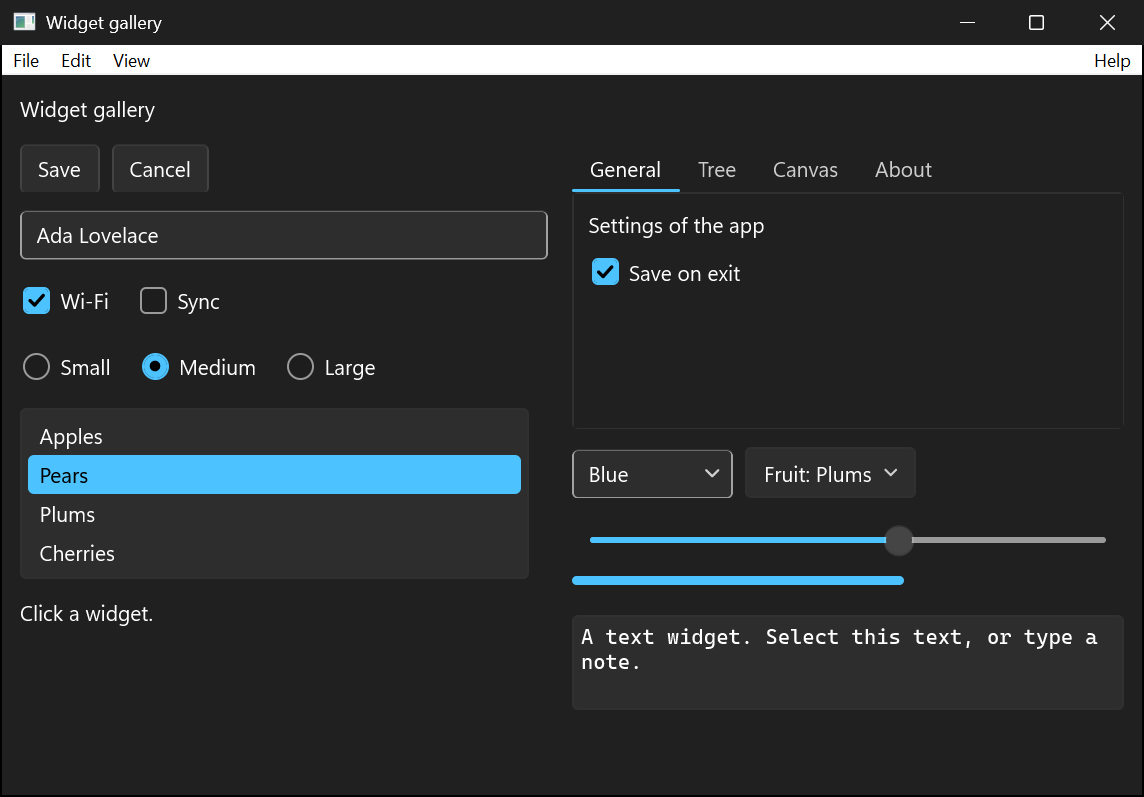
ztk::style schemegiveslightordark..gets<<SchemeChanged>>at a change of the mode, so a script can draw its own colors again (Dark mode).- A rule of a style sheet in
@media (prefers-color-scheme: dark)has the colors of the dark scheme (Styling). ztk --darkforces the dark scheme.ztk::style theme classicgives the look of Tk on X11.
Text and fonts
DirectWrite draws the text with the fonts of Windows, with the grayscale antialiasing of Windows 11 apps.
| Font | On Windows |
|---|---|
| The default font | Segoe UI Variable with the optical size of each size, or Segoe UI on Windows 10. |
monospace, TkFixedFont |
Cascadia Mono. |
| Each other family | The font of Windows with that name. |
ttk::label .a -text "Segoe UI Variable"
ttk::label .b -text "Consolas, 14" -font {Consolas 14}
ttk::label .c -text "Georgia, italic" -font {Georgia 14 italic}
pack .a .b .c -anchor w -padx 16 -pady 4

The scale
Each window has the scale of its monitor, and the scale changes when the window moves to another monitor. Sizes in a script are logical pixels, so a layout keeps its size at 100 %, 150 %, and 200 %.
Keys and the pointer
The keys have the keysyms of Tk. Control, Shift, and Alt in a binding are the keys of those names. Alt+F4 closes the window.
bind . <Control-s> {puts save}
bind . <Control-Shift-s> {puts "save as"}
The entry and the text widget copy, cut, and paste with Control-C, Control-X, and Control-V through the clipboard of Windows. The text of an input method goes into an entry or a spinbox through the Text Services Framework.
| Pointer | Event |
|---|---|
| The left, middle, and right buttons | Buttons 1, 2, and 3. |
| The two side buttons | Buttons 8 and 9. |
| The wheel, in both directions | The wheel events of Tk. |
The pointer shows the cursor of each widget, from -cursor or the style cursor.
The keyboard focus
Tab and Shift-Tab move the focus between the widgets that take it. The widget with the focus shows its focus ring.

ztk examples/platform-gallery.tcl focus=entry.Screen readers
A screen reader such as Narrator finds each widget of a window through UI Automation, with its type, its name, its place, and the states enabled and focused. A screen reader can press a button, toggle a check box, and read and set the text of an entry.
It gets an event when the focus moves. The text of an entry with -show stays hidden.
Less motion
When the setting "Animation effects" of Windows is off, ztk::animate shows the end state of each animation at once (Animation).
The next page, Menus, shows the menus of Windows.