Widgets on macOS
The widgets of Tk and ttk work on macOS with no change to a script. This page shows how they look on a Mac, and the keys and the text that differ from the other platforms.
The look of AppKit
On macOS the default theme has the look of AppKit. ztk draws each widget itself, with the sizes, the corners, and the colors that it measured from the AppKit controls.

ztk examples/platform-gallery.tcl tab=tree.The window follows two settings of macOS, also while the app runs:
| Setting | What follows it |
|---|---|
| Appearance: Light, Dark, or Auto | The colors of each widget. |
| Accent color | The default button, the check boxes, the switches, and the scales. |

ztk examples/platform-gallery.tcl tab=canvas.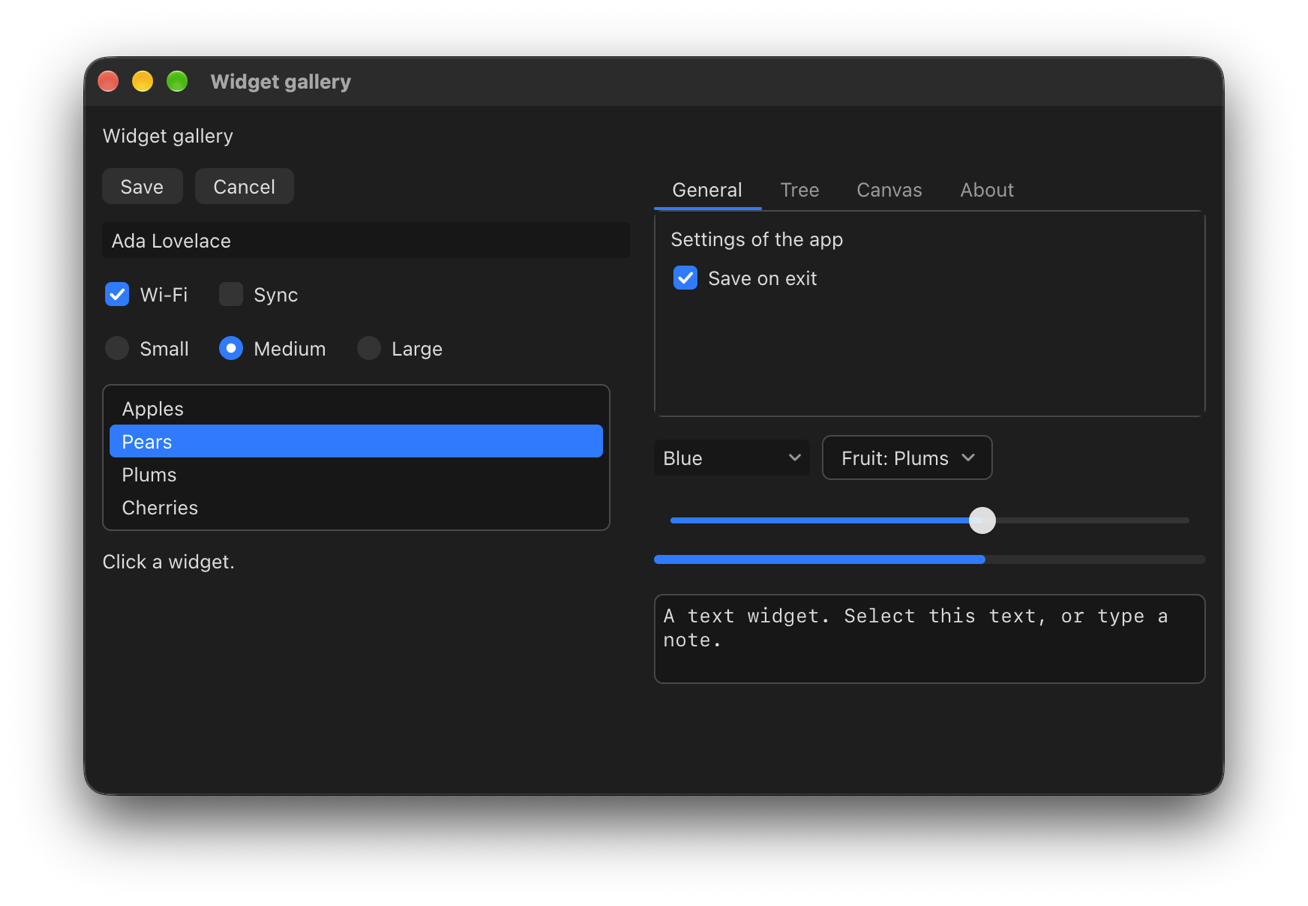
ztk::style schemegiveslightordark..gets<<SchemeChanged>>at a change of the mode, so a script can draw its own colors again (Dark mode).- A rule of a style sheet in
@media (prefers-color-scheme: dark)has the colors of the dark scheme (Styling). ztk --darkforces the dark scheme.ztk::style theme classicgives the look of Tk on X11.
Text and fonts
Core Text draws the text, as AppKit does. The default font is SF Pro, the system font, at 13 points. monospace, Courier, and TkFixedFont are SF Mono. Each other font of the Mac works by its family name:
ttk::label .a -text "The system font"
ttk::label .b -text "Menlo, 14 points" -font {Menlo 14}
ttk::label .c -text "Georgia, italic" -font {Georgia 14 italic}
pack .a .b .c -anchor w -padx 16 -pady 4
On a Retina display a window draws at twice the pixels. It changes its scale when it moves to another kind of display.
The Command key
In a binding, Command is the Command key and Option is the Option key. Control stays the Control key.
bind . <Command-s> {save}
bind . <Command-Shift-s> {saveAs}
bind . <Option-Left> {wordLeft}
Command-C and Command-V in text
The entry and the text widget copy, cut, and paste with Control-C, Control-X, and Control-V, as on Linux and Windows. These bindings give them the Command keys of a Mac:
if {[tk windowingsystem] eq "aqua" || [ztk::has mac]} {
    foreach class {Entry TEntry Spinbox TSpinbox TCombobox Text} {
        bind $class <Command-c> {event generate %W <<Copy>>}
        bind $class <Command-x> {event generate %W <<Cut>>}
        bind $class <Command-v> {event generate %W <<Paste>>}
        bind $class <Command-a> {event generate %W <<SelectAll>>}
        bind $class <Command-z> {event generate %W <<Undo>>}
    }
}
ztk::has mac is 1 on macOS. tk windowingsystem gives aqua only with ztk --windowingsystem aqua, so the script tests both.
The pointer and the trackpad
A click is button 1. A right click, or a click with two fingers on the trackpad, is button 3, as on the other platforms. Bind Control-click too for a mouse with one button (Context menus).
listbox .l
pack .l -padx 20 -pady 20
.l insert end Apples Pears Plums
bind .l <Button-3> {puts "a right click on row [.l nearest %y]"}
The keyboard focus
Tab and Shift-Tab move the focus between the widgets that take it. The widget with the focus shows the focus ring of macOS. A ttk::button with -default active has the accent fill of the default button of a Mac dialog.

ztk examples/platform-gallery.tcl focus=entry.Less motion
When Reduce motion is on in the Accessibility settings, ztk::animate shows the end state of each animation at once. A change of the setting while the app runs has an effect at once. Animation has the details.
The next page, Menus, shows the menu bar of macOS.