Skate Pond 5: Screens
In this step you build the screens of the game: the title, the picker of levels, the play, and the end of a level. You learn a state machine for input, text and fonts on a canvas, and a picker that the canvas draws.
One variable holds the screen
The game keeps its screen in g(state): title, pick, play, dead (a fall into the water), or clear (the flag). toy_input switches on the state, so each key does the right thing on each screen (the code):
proc toy_input {key state} {
    global g sk
    if {$state ne "press"} return
    switch $g(state) {
        title {
            switch $key {
                a - start { sfx start; start [continueAt] }
                left - right - down { sfx move; picker [continueAt] }
            }
        }
Each screen has one proc that sets the state and draws the screen: title, picker, and start. The loop also reads the state: on the title, tick moves the skater on a slow loop around the box of the title (the code). This pattern is a state machine. It keeps the rules of each screen in one place, and a new screen is a new branch of switch.
The snippet has three screens and the same pattern. Press Enter or Right on the title, or click it.
# One proc gets each input, and the state picks what it does.
# Tap or click the screens, or press Enter, the arrows, and Escape.
canvas .c -width 336 -height 220 -background #0f1b2d -highlightthickness 0
pack .c
. configure -background #0f1b2d
array set g {state title sel 0}
# Three stars as canvas polygons: gold for each one of n.
proc stars {x y n} {
    for {set k 0} {$k < 3} {incr k} {
        set cx [expr {$x + ($k - 1) * 26}]; set pts {}
        for {set i 0} {$i < 10} {incr i} {
            set r [expr {$i % 2 ? 4.5 : 11}]; set a [expr {-1.5708 + $i * 0.6283}]
            lappend pts [expr {$cx + $r * cos($a)}] [expr {$y + $r * sin($a)}]
        }
        .c create polygon {*}$pts -fill [expr {$k < $n ? "#ffc93c" : "#2c4566"}] \
            -outline [expr {$k < $n ? "#ffe08a" : "#4a6a90"}]
    }
}
proc title {} {
    set ::g(state) title
    .c delete all
    .c create text 168 60 -text "SKATE POND" -fill #eef5fb -font {TkFixedFont 22 bold}
    .c create text 168 96 -text "Continue: 1. First Ice" -fill #eef5fb -font {TkFixedFont 11 bold}
    stars 168 124 2
    .c create text 168 180 -text "Enter: skate      Right: all ponds" -fill #8fa9c4 -font {TkFixedFont 9 bold}
}
# The picker: a card for each pond. The arrows move the gold frame.
proc picker {} {
    global g
    set g(state) pick
    .c delete all
    for {set i 0} {$i < 8} {incr i} {
        set x0 [expr {4 + ($i % 4) * 83}]; set y0 [expr {4 + ($i / 4) * 100}]
        .c create rectangle $x0 $y0 [expr {$x0 + 79}] [expr {$y0 + 96}] -fill #1d3150 \
            -outline [expr {$i == $g(sel) ? "#ffc93c" : "#2c4566"}] -width [expr {$i == $g(sel) ? 3 : 1}]
        .c create text [expr {$x0 + 6}] [expr {$y0 + 70}] -anchor w -text [expr {$i + 1}] -fill #eef5fb -font {TkFixedFont 10 bold}
    }
}
proc play {} {
    set ::g(state) play
    .c delete all
    .c create text 168 100 -text "Pond [expr {$::g(sel) + 1}]" -fill #eef5fb -font {TkFixedFont 16 bold}
    .c create text 168 130 -text "Escape: back to the title" -fill #8fa9c4 -font {TkFixedFont 9 bold}
}
proc toy_input {key} {
    global g
    switch $g(state) {
        title { switch $key { start { play } right { picker } } }
        pick {
            switch $key {
                left - right { set g(sel) [expr {($g(sel) + ($key eq "left" ? 7 : 1)) % 8}]; picker }
                start { play }
                back { title }
            }
        }
        play { if {$key eq "back"} title }
    }
}
set keys {Return start Escape back Left left Right right}
bind . <KeyPress> { if {[dict exists $keys %K]} { toy_input [dict get $keys %K] } }
# A tap: the title goes to the picker, and a card plays its pond.
bind .c <ButtonPress-1> {
    switch $g(state) {
        title { toy_input right }
        pick {
            set col [expr {int((%x - 4) / 83)}]; set row [expr {int((%y - 4) / 100)}]
            if {$col >= 0 && $col < 4 && $row >= 0 && $row < 2} { set g(sel) [expr {$row * 4 + $col}]; play }
        }
        play { toy_input back }
    }
}
title

Text on a canvas
A text item draws a string at a point. By default the point is the middle of the text, so .c create text 168 60 centers the title on a canvas of 336 pixels. -anchor w puts the left edge of the text at the point, for the numbers of the cards.
The game uses TkFixedFont, the monospace font of Tk, with a size and a weight: -font {TkFixedFont 22 bold}.
Stars from a polygon
The game draws its stars as polygons, from a loop of ten points: an outer point and an inner point in turn (the code). A star glyph of a font looks different in each font. A polygon looks the same everywhere, and it can have a fill and an outline of its own.
set r [expr {$i % 2 ? 4.5 : 11}]; set a [expr {-1.5708 + $i * 0.6283}]
lappend pts [expr {$cx + $r * cos($a)}] [expr {$y + $r * sin($a)}]
The picker is a canvas too
The picker shows eight cards on a page. Each card has a small map of its pond (one rectangle of 6 pixels for each square that is not ice), its number, its stars, and the letters of its modifiers (the code).
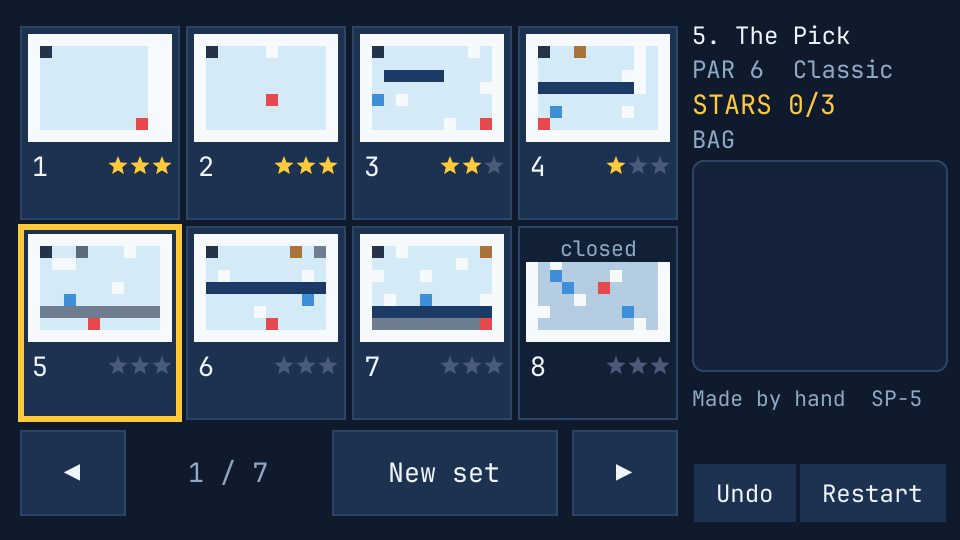
A tap finds its card with arithmetic: the cards are on a grid of 83 by 100 pixels (the code).
set col [expr {int(($x - 4) / 83)}]; set row [expr {int(($y - 4) / 100)}]
With a mouse, the first click selects a card, and a second click plays it. On a touch screen, one tap plays it. The map of a pond from the generator needs time, so drawPicker shows "..." on its card and makes one map in each later call of after 1. The page shows at once, and the maps fill in.
The end of a level
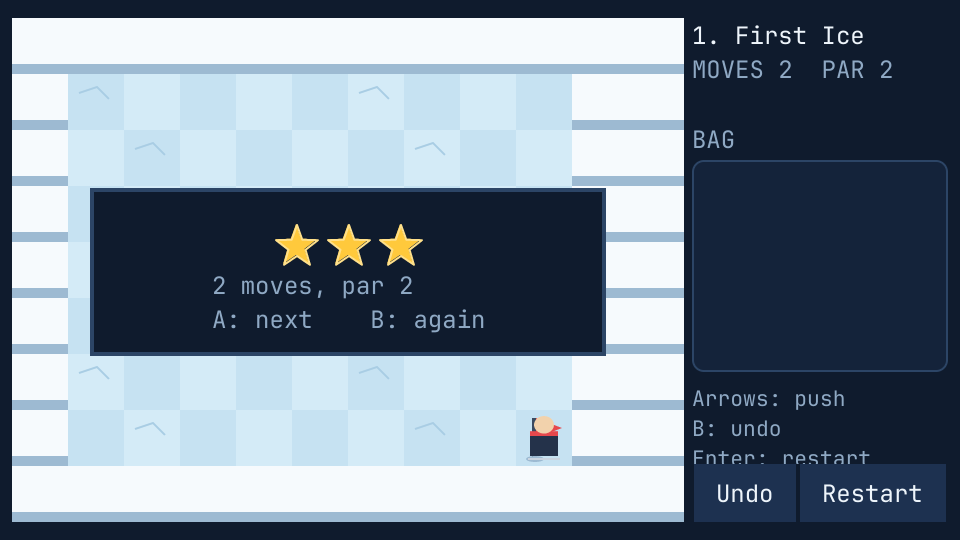
At the flag, arrive counts the stars, saves, sets the state to clear, and shows a box with the stars and the next keys (the code). The box is a rectangle with the tag msgbox and two text items, msg and msg2, that pond made at the start. The proc say sets the two texts. It shows the box with -state normal, or hides it with -state hidden when both texts are empty (the code).
Next: 6. Levels from a seed.